

You connect the charger, the icon appears, and then nothing really happens. Twenty minutes later your battery is still at where you left. There are ways you can fix slow charging without replacing your phone battery. In most cases, you may find that the problem is not the battery itself but the components you are using to charge the device.
Low wattage charger, faulty cable, lint stuck inside the charging port, overheating, or apps in the background while your phone is being charged are among the leading causes. You need to change your charger, clear the charging port, exit all the applications running in the background, and wait for your device to cool down before trying to charge it again.
If nothing helps, then there is a possibility of hardware fault including worn out ports, dead battery, or broken charging IC.
| Possible Cause | Checks |
|---|---|
| Weak or wrong charger | Grab one rated for your phone’s protocol and test |
| Damaged cable | Swap it. Compare the speed. |
| Dirty port | Look for lint or debris. Clean gently. |
| Background apps or heat | Kill the heavy apps, cool the phone, retest |
| Battery past its life | Settings > Battery Health. Below 80% is your answer. |
| Port, IC, or flex fault | Still slow after everything above? Professional diagnosis. |
Why Is My Phone Charging Slowly?
Most people blame the battery, but charging speed actually depends on every piece in the chain: wall outlet, adapter, cable, port, the power management IC on the board, whatever software is running, and the cell itself. One weak link drags the whole thing down.
Most Common Causes
- Cables tend to fail first. Internal wires fray from constant bending near the connector end, resistance climbs, and the phone’s charging controller detects the voltage drop. It throttles the intake. A low-power adapter does the same thing differently. Older bricks and laptop USB ports often put out 5W. Your phone wants 18W to 100W or more.
- Lint is another common culprit. Months of pocket carry compact dust at the bottom of the charging port. The cable cannot seat flush, the pins lose contact, and the handshake between charger and phone either fails or drops to a lower power tier.
- Then there is the battery itself. Lithium-ion cells age with every cycle. Internal resistance goes up, and the battery management system responds by slowing the charge rate to prevent swelling. If your phone reports battery health below 80%, start there.
- Background apps matter more than people think. GPS, gaming, video, downloads. All of them pull current from the charger before it reaches the battery. Heat compounds it. Phone gets warm, OS cuts charging current. A bad port, failed charging IC, or a firmware bug can produce the same symptom. If the battery also drains fast on a full charge, the overlap with android battery draining fast is worth reading.
How Fast Charging Works
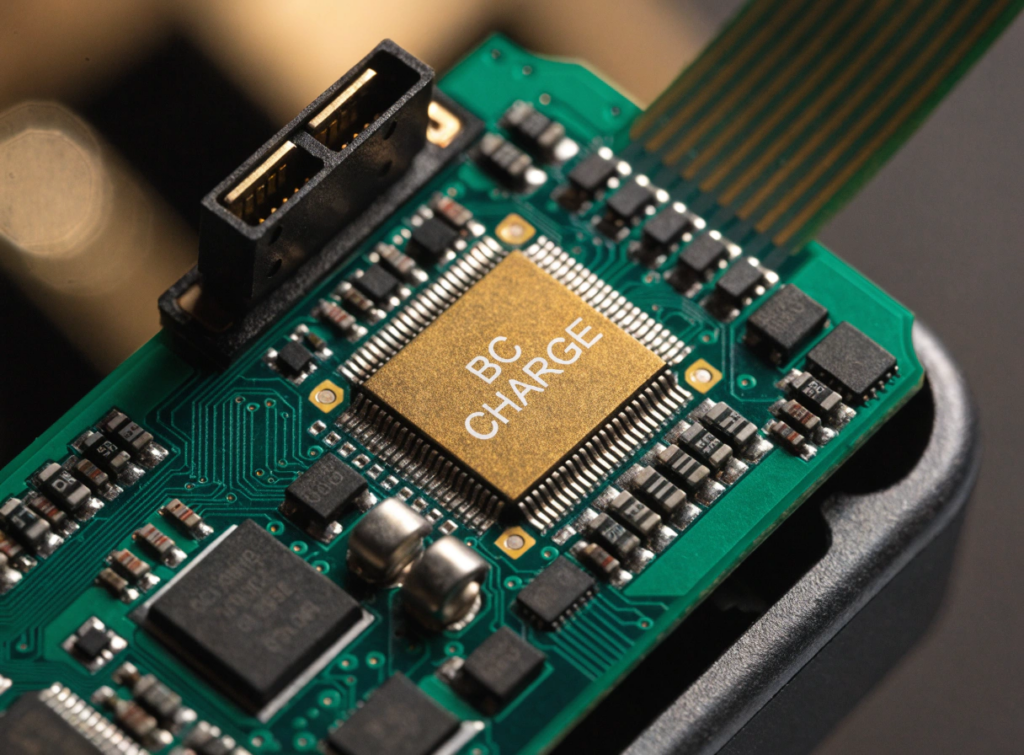
Fast charging is not only about the ability of your device to get more voltage and amperage from a power source. You need a phone and a charger with the same protocol and a special cable. As soon as your phone is connected to a charger that supports the protocol, your phone tries to negotiate for the maximum amount of volts and amps needed, and the charger supplies them.
USB-PD protocol, regulated by USB Implementers Forum, is the standard one for fast charging. It has 3.1 revision that allows to provide power up to 240 W through USB-C connector.
You do not need to memorize protocols. Compatibility is what matters. A 65W charger does nothing for a phone that caps at 25W on a different standard. And some cables are data-only. They physically cannot carry the current fast charging needs.
7 Easy Ways to Fix Slow Charging
Start with the simple checks. Most of the time the problem is outside the phone.
- Try the original charger, or any certified one that matches your phone’s protocol. A weak adapter charges the phone, just slowly. Fast charging disappears entirely if the protocol does not match.
- Try swapping the cable. They wear out faster than you would expect from bending near the plug, internal wire breaks, or a loose fit. If a new cable fixes the speed, the old one was your problem.
- Clean the port carefully. Power off the phone and use a wooden or plastic pick instead of anything metal. Bent pins inside the port turn a two-minute cleaning into a repair job.
- Try a restart. That can clear software glitches that interfere with charging behavior. Especially worth doing if charging slowed down suddenly without any change in accessories.
- Close your background apps while testing. Things like navigation, games, and video streaming eat incoming power before it reaches the battery. If charging speeds up with the phone idle, that tells you something.
- Let the phone cool down if it feels warm. Phones throttle charging when they overheat, and charging under a pillow, in the sun, or while running a heavy game makes it worse. Repeated overheating during basic charging is not normal. That points to hardware.
- Update your operating system. Firmware controls how the phone negotiates with chargers. A software update will not fix a broken port, but it rules out a whole category of causes.
Software Solutions for Slow Charging
You need to check your battery settings before opening the phone. Optimized Battery Charging on iOS and Adaptive Charging on Android deliberately hold the charge at 80% until close to the time you normally unplug. Disable them temporarily to see if they are capping throughput.
Old firmware causes problems too. Miscalculated battery readings, failed protocol negotiation with the charger. Install whatever update is available, particularly if slow charging started after a system change or a botched update.
If it is still slow, try booting into Safe Mode. That disables every third-party app. If charging returns to normal speed, something you installed is draining power. Factory reset is the last software step. If charging stays slow on a clean reset, the cause is hardware.
Hardware Problems That Cause Slow Charging
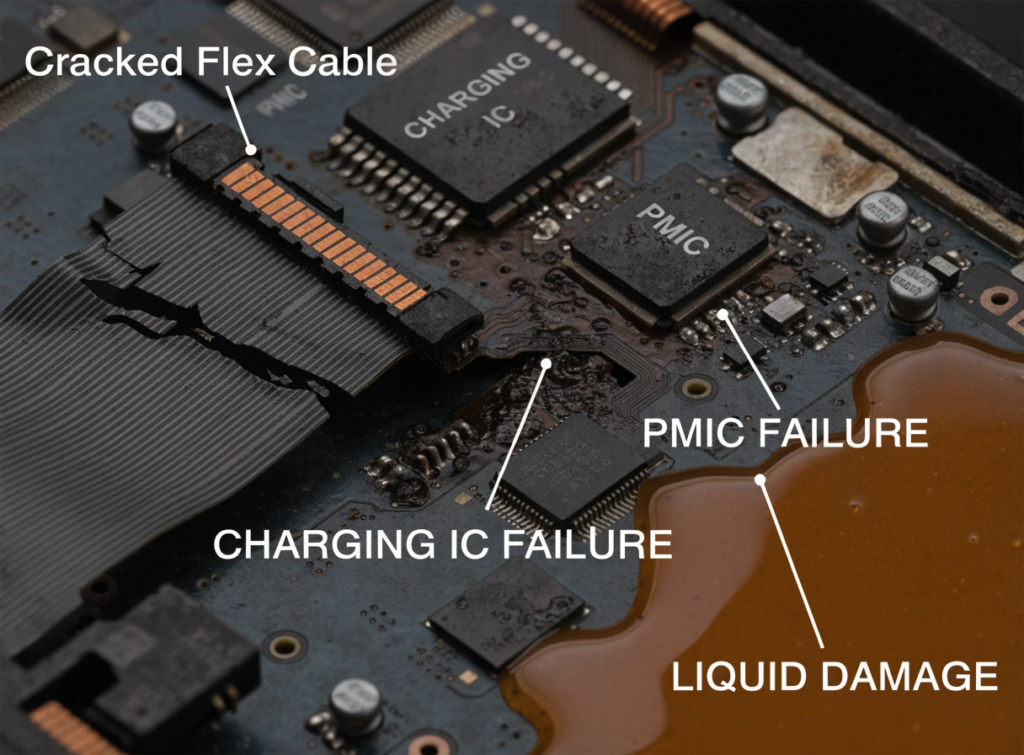
If software changes did not fix the problem, you are likely looking at physical wear or a board-level fault.
- Worn charging port
The cable feels loose, falls out, or only charges at a specific angle. This happens when the retention springs inside the port wear down from daily plugging and unplugging.
- Crooked connector pins
The device fails to charge properly or gets stuck in the low charging rate mode. Bumping the cable into the port, compacted dust, or even dropping the phone causes bending or shifting of the small contacts within the port.
- A worn-out battery
The phone loses power quickly, fails to charge past 80%, or shows obvious swelling. Numerous cycles of charging lead to increased resistance inside the battery.
- Cracked flex cable
Charging cuts out when you press on the lower frame of the phone. A drop or bend can crack the thin copper traces on the flexible printed circuit that connects the port to the board.
- Charging IC failure
The screen shows the charging icon, but the battery percentage never moves. A voltage spike, liquid exposure, or a cheap third-party adapter can damage the charging IC on the motherboard.
- PMIC failure
The phone will not boot, or the board area near the processor gets very hot. Shorted filter capacitors or damaged power rails on the PMIC can shut down the entire power distribution system.
- Liquid damage
You can see corrosion inside the port or the phone displays a persistent moisture warning. Oxidation from liquid exposure shorts out the conn
How Repair Shops Diagnose Slow Charging
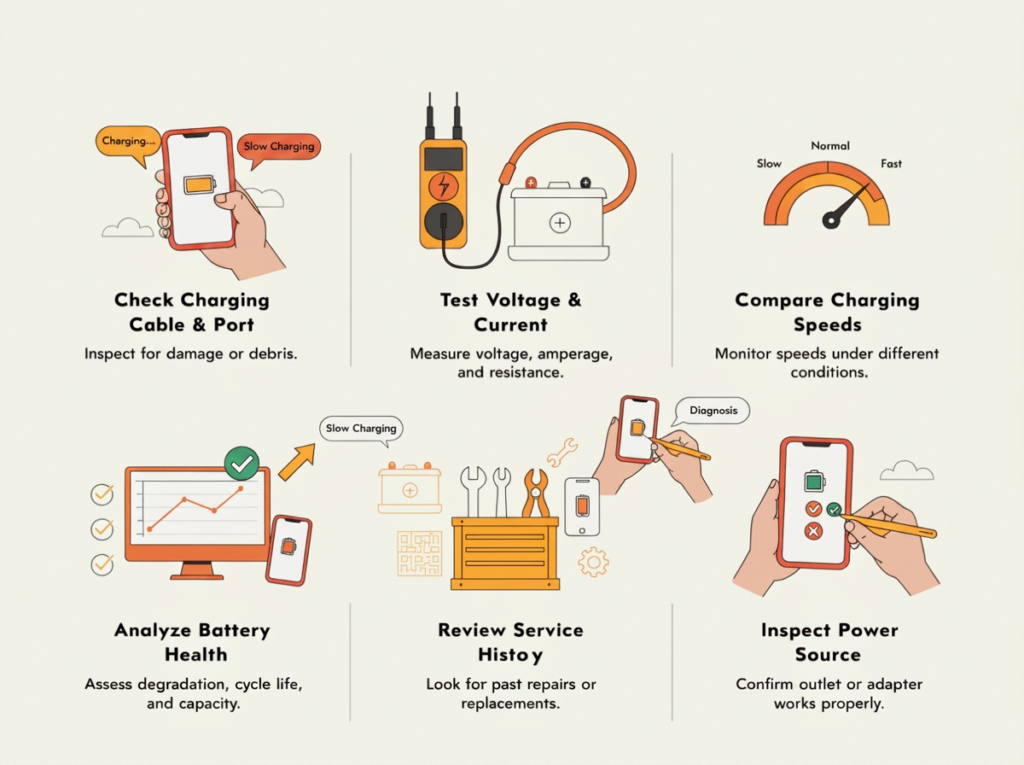
Guessing leads to wasted parts. A repair shop that replaces batteries based on symptoms alone ends up doing the same job twice when the port or IC was the real problem.
The first test is a known-good charger and cable. If the phone charges normally with those, the fault is outside the phone. If it is still slow, the next step is a USB power meter that shows voltage, current, and wattage in real time. Low or jumping current narrows the issue to the port, battery, or board.
Battery health check comes next. A cell with poor capacity or swelling charges slowly no matter what charger you connect. Technicians compare against a known-good battery before writing up a replacement.
The port gets inspected under magnification. Lint, bent contacts, corrosion, cracked solder, liquid residue. If it looks clean, continuity testing confirms whether the flex cable is carrying power to the board correctly.
Thermal imaging helps on board-level faults. A component that heats up faster than everything around it points the technician to the right area. Our phone repair cost guide has typical pricing for these diagnostics across common models.
| / | Fast Charging | Standard Charging |
|---|---|---|
| Power | 18-100W+ | 5-10W |
| Speed | High | Moderate |
| Heat | Higher, managed by onboard algorithms | Lower |
| Battery wear | Controlled by thermal management | Lower overall |
Modern systems reduce power automatically as the cell heats up or nears full. A supported fast charger does not burn through batteries the way people assume. Trouble starts when the parts do not match. Wrong charger, bad cable, worn port, aging battery. Any mismatch and the phone never enters fast mode. The overview of USB charging history explains how the protocols got this fragmented.
When Does Battery Replacement Fix Slow Charging?
Only when the cell itself is the bottleneck. Signs include a high cycle count (500 to 800 full cycles or more), capacity below 80%, visible swelling, charging that stalls past 80%, or unexpected shutdowns while plugged in.
A new battery will not help if the fault is somewhere else. A 5W charger, corroded port, bent pins, fried charging IC. All of those produce the same slow charging with a brand-new battery installed. Diagnose first.
OEM vs. Aftermarket Charging Components
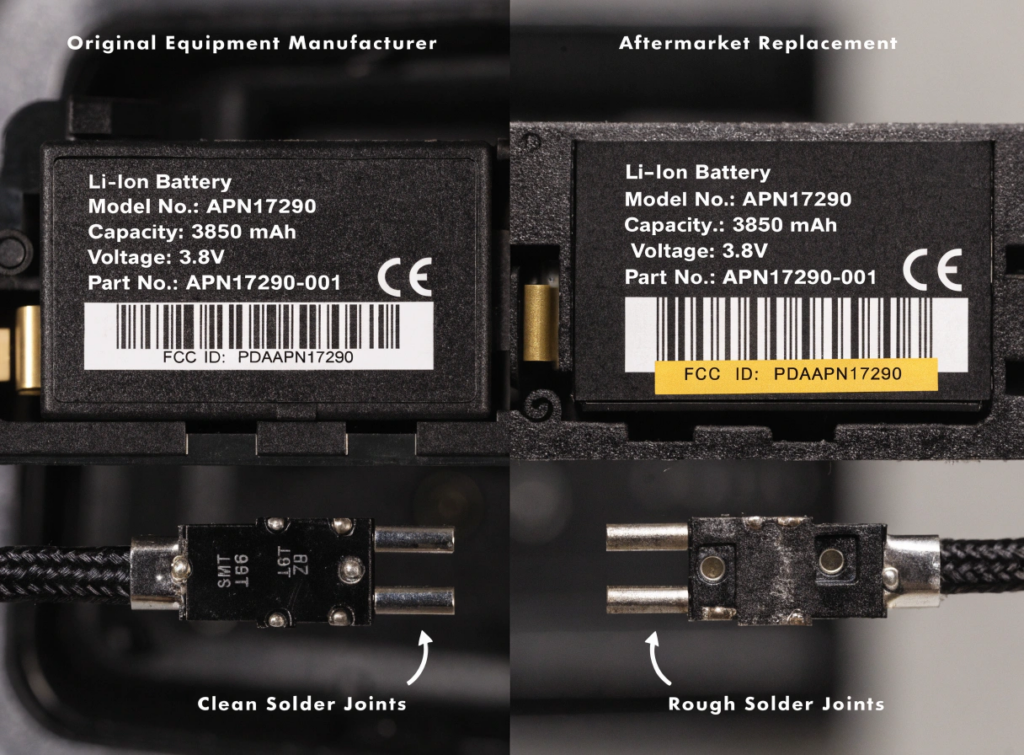
For shops buying parts in volume, the grade of those parts matters. OEM components match factory spec exactly, while premium aftermarket parts get close without the cost. Low-grade aftermarket is where problems show up: loose connectors, slow power transfer, and high return rates. Our iPhone 14 Pro Max battery replacement guide covers what to verify before placing an order.
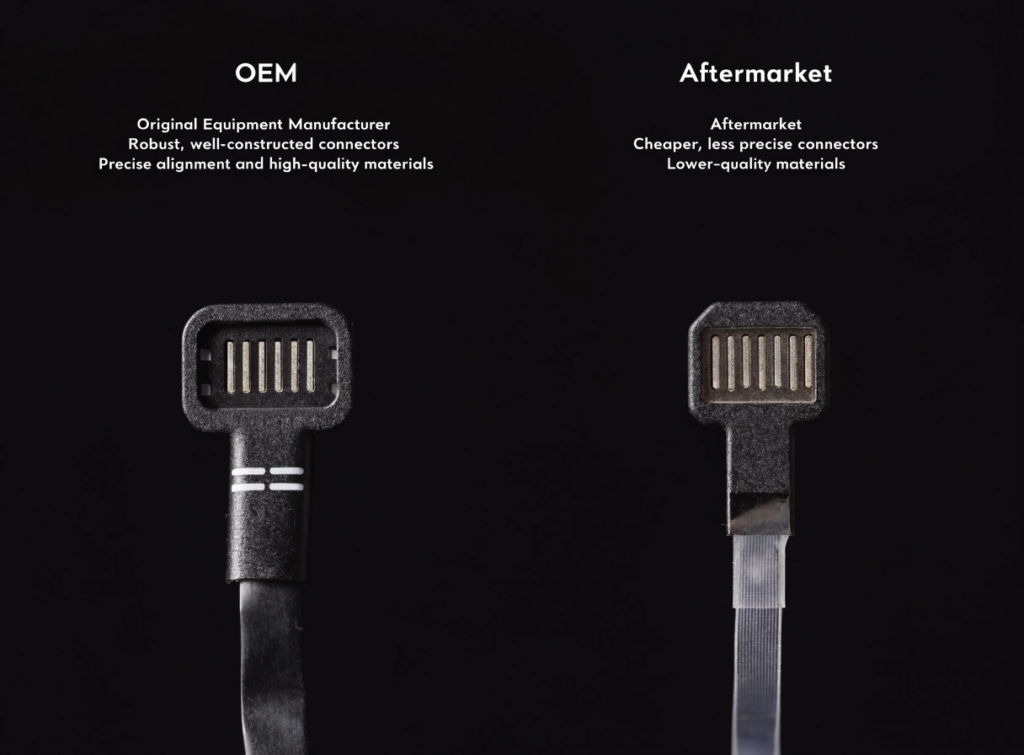
OEM parts deliver excellent stability since they match factory voltage and amperage tolerances exactly. Premium aftermarket parts rate high and maintain stable charging across supported protocols.
- Protocol compatibility: OEM components offer full native protocol support. Premium aftermarket parts support all current OS versions and charging standards.
- Durability: OEM parts use factory-standard materials and construction. Premium aftermarket parts often use reinforced connectors and upgraded flex materials to improve longevity.
- Unit cost: OEM parts cost more per unit. Premium aftermarket parts are significantly cheaper, which gives repair shops higher margins on each job.
- Supply availability: OEM components have limited regional distribution and can be harder to source consistently. Premium aftermarket parts are available in steady bulk supply from established distributors.
Tips to Prevent Slow Charging
Use a certified charger and cable that match your phone’s protocol. Keep the port clean. Avoid charging in a hot car, under blankets, or while running demanding apps. Replace any cable the moment it starts needing a specific angle to work, and do not leave the battery sitting at zero for days.
If you run a repair shop, add battery health checks to your routine testing. Watch for capacity trending down, unusual heat during charging, or inconsistent current draw. Catching those early prevents the kind of repeat complaints that eat into margins.
FAQs
Why does my phone charge slowly but not drain the battery?
The reason your device charges slowly may be low power supply, due to the use of a bad charger, broken cord, lint in the port, applications running in the background, heat, etc. The phone will still be charging because the battery is continuously charging. Try charging with another charger and cable.
Will a bad charging cable affect the charging speed of the phone?
Yes, it can. The reasons include low power delivery to the phone because of broken wires, a loose connection, or other internal problems. The symptoms include disconnections or disappearance of the fast charging logo. The simplest method of determining this problem is testing with a working cable.
Will a dirty charging port decrease charging speed?
Yes, the compacted lint prevents the plug from being inserted completely. Poor connection occurs or it fails altogether.
Does battery health affect charging speed?
Once battery capacity drops below 80%, you can expect slower charging. Swelling, overheating, and unexpected shutdowns during charging are all signs that the cell itself is the issue. Replacing it helps only when the battery is actually the cause. A bad cable or damaged IC produces the same symptom with a new battery.
Can overheating slow charging?
Yes. The OS cuts charging current to protect the cell. If speed returns after cooling, heat was the bottleneck. Overheating during regular charging sessions should raise the alarm regarding the hardware.
How is charging trouble detected in repair centers?
Repair centers employ a systematic approach that involves checking the current and voltage using a USB power meter, evaluating the battery’s condition, inspecting the ports using a microscope, running a continuity test on the flex cable, and replacing parts if necessary.
Conclusion
Slow charging could be a result of the cable, charger, port, background apps, overheating, battery age, or a board problem. It’s important to conduct the basic troubleshooting steps before opening the device and swapping components inside.
For service centers, it is the golden rule to test rather than make assumptions. Voltage/Current testing, battery diagnostics figures, port checking, and component replacement with new ones. This sequence will either help you repair the correct component or eat the warranty claim..
SQLCD supplies phone batteries and charging ports for repair shops, wholesalers, refurbishers, and technicians. You can reach out for product availability, samples, or wholesale pricing by clicking on the contact us page.