
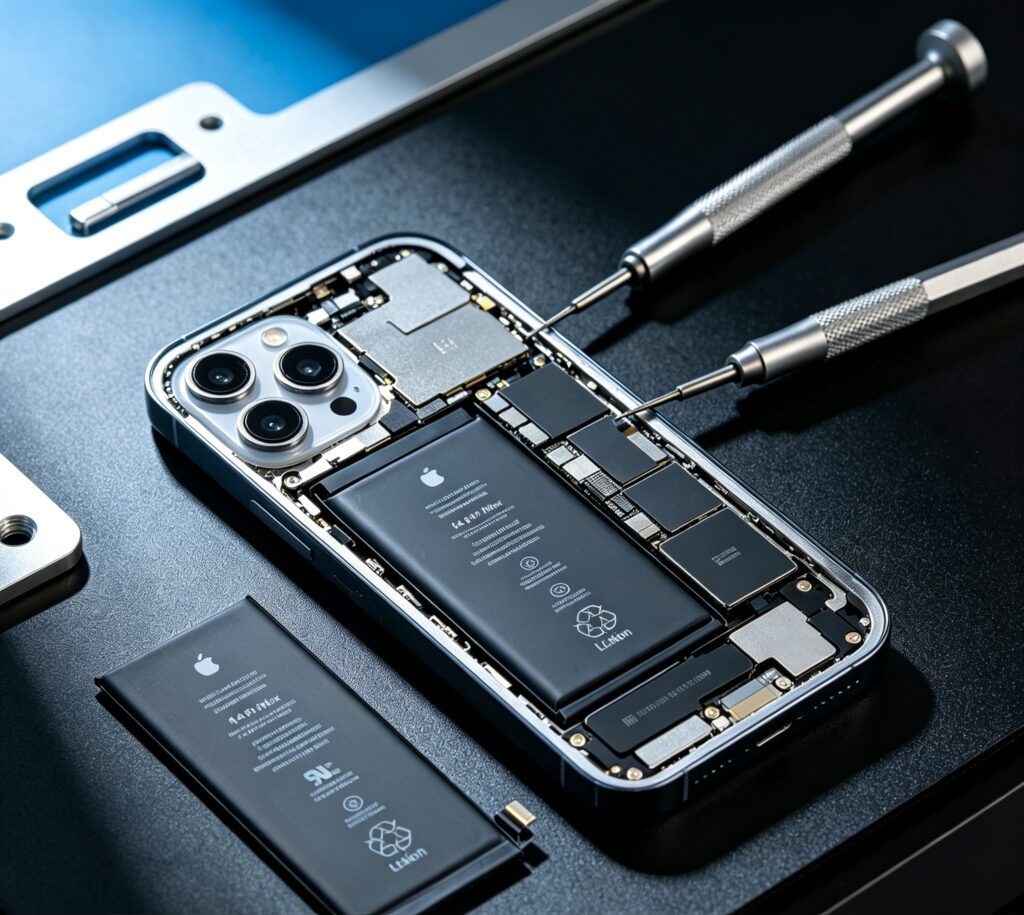
Battery degradation is one of the most common issues affecting iPhone 14 Pro Max users. When battery health drops below 80%, shorter usage time, performance limits, and unexpected shutdowns often indicate that a replacement is needed.
This guide explains battery specifications, replacement steps, OEM vs genuine Apple options, and key considerations for repair businesses.
iPhone 14 Pro Max Battery Specifications
| Model | Battery Capacity (mAh) | Typical Voltage | Watt-Hours (Wh) | Battery Type | Apple Battery Model Code |
| iPhone 14 Pro | 3,200 mAh (approx.) | 3.82 V | 12.38 Wh | Lithium-ion | A2868 |
| iPhone 14 Pro Max | 4,323 mAh (approx.) | 3.82 V | 16.68 Wh | Lithium-ion | A2894 |
These specifications help technicians select compatible replacement batteries and avoid performance issues after installation.
iPhone 14 Pro Max Battery Selection Guide
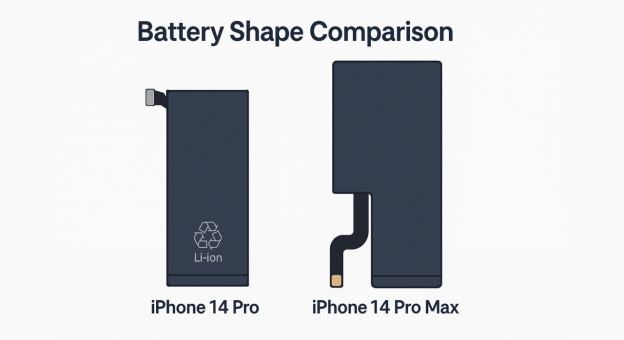
When selecting a replacement battery for the iPhone 14 Pro Max, technicians should consider compatibility, voltage stability, and battery quality. Choosing the wrong battery may lead to charging issues, overheating, or reduced performance.
- Compatibility difference: iPhone 14 Pro and 14 Pro Max batteries differ in capacity, size and connectors and cannot be interchanged.
- Voltage stability requirement: OEM-grade batteries with full safety and cycle tests deliver steady charging performance.
Step-by-Step iPhone 14 Pro Max Battery Replacement Process
Replacing the iPhone 14 Pro Max battery requires precision, the right tools, and strict safety precautions to avoid damaging the device. Technicians should follow each step carefully and maintain proper temperature control and ESD protection throughout the process.
Important Safety Warnings Before You Begin
- Discharge the battery before repair to reduce safety risks, especially when handling damaged or swollen batteries.
- Use controlled heat during display removal to prevent damage to the OLED panel, cables, and internal components.
- Avoid applying excessive force when removing the battery to prevent cell damage or safety issues.
- Inform customers that opening the device may affect the original warranty and water-resistance performance.
Step 1:Open the Device and Remove the Display
Power off the iPhone, remove the screws, and apply controlled heat to loosen the display adhesive. Carefully separate the screen to avoid damaging the OLED panel, Face ID components, or internal cables.
Step 2:Disconnect Display & Battery Cables
Remove the internal connector brackets using a precision screwdriver. Detach the following using a plastic spudger:
- Battery connector
- Display cable
- Sensor and antenna cables
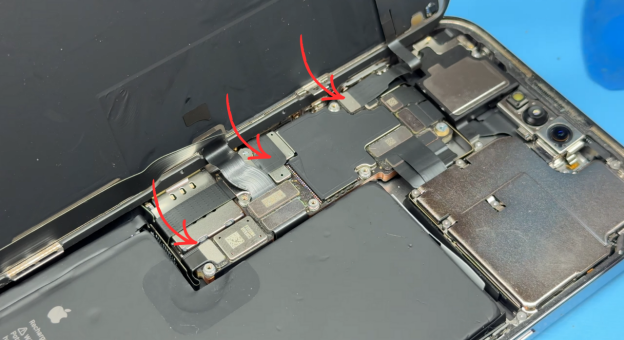
Caution: Only proceed once the battery is fully disconnected.
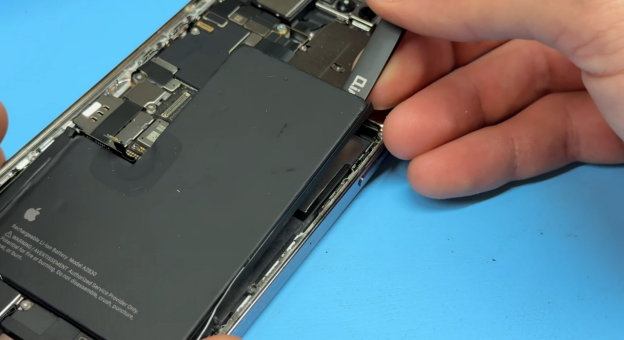
Step 3:Remove & Install Battery
Remove the old battery carefully and install the replacement battery with proper alignment. Avoid damaging the battery cell or connectors during installation.
Step 4:Final Assembly & Testing
Reinstall the connector brackets and screws. Seal the iPhone display by aligning the edges and pressing firmly around the perimeter. Replace the bottom Pentalobe screws to complete the installation.
Common Mistakes During iPhone 14 Pro Max Battery Replacement
- Excessive heat usage – can damage OLED display, Face ID module, or internal sealing
- Damaging battery connector – may cause charging issues or motherboard failure
- Skipping testing: May result in inaccurate battery performance evaluation.
- Using low-quality adhesive – reduces sealing quality and weakens screen alignment
Post-Replacement Best Practices & Notes
- After replacement, the device may lose its original water-resistance/IP sealing. Properly replacing adhesive reduces the risk but does not guarantee IP preservation.
- If the replacement battery is not “genuine Apple parts,” iOS may show a warning about “Battery Unable to verify this iPhone has a genuine Apple battery.” On newer iOS versions, compensate accordingly (or offer calibration support if OEM is high-quality).
- Always use ESD-safe tools and avoid metal contact with battery cells to prevent fire or thermal runaway.
OEM vs Original Battery for Repair Shops
Choosing between original and OEM batteries depends on cost, availability, and repair business needs. For most repair shops, a reliable OEM battery offers a better balance between performance and profitability.
| Feature / Spec | Original (Genuine Apple Parts) | High-Quality OEM Battery |
| Battery Capacity | Matches exact Apple specs | Matches or slightly varies |
| Battery Health Accuracy | 100% accurate | May show slight variation |
| Performance & Longevity | Best in class | Good when properly manufactured |
| Heat & Overheating Control | Excellent thermal management | Depends on the quality level |
| Availability | Hard to source | Easy to purchase in bulk |
| Price / Repair Cost | High | More affordable |
| Tools Needed | May require Apple tools | Standard repair tools |
| Warranty Considerations | Better alignment with device warranty | Depends on supplier QC |
| Ideal For | Premium clients & authorized shops | Repair shops, wholesalers, refurbishers |
Post-Replacement Testing Checklist
Before returning the phone to the user, run these quick tests:
- Confirm the new battery charges typically (wired + wireless).
- Check battery health loads correctly in Settings.
- Test the display touch response, True Tone, and Face ID after reconnecting the screen.
Where to Buy iPhone 14 Pro Max Batteries in Bulk?
Reliable battery suppliers help repair businesses maintain consistent quality, reduce warranty risks, and improve repair efficiency.
When choosing a supplier, consider:
- Battery testing standards
- Stable inventory
- QC reports
- Technical support
SQ provides OEM-grade iPhone batteries with strict quality control and stable supply support for repair businesses and distributors.
Why Repair Shops Choose SQLCD?
- OEM-grade cells
- Strict QC testing
- Stable inventory
- Global shipping
- Technical support
FAQs
Is it worth replacing an iPhone 14 Pro Max battery?
Yes. Replacing the battery restores battery life, improves performance, and extends the device’s lifespan at a much lower cost than upgrading to a new phone.
Can a bad battery damage the motherboard?
Yes. Poorly manufactured batteries or units with unstable ICs can cause voltage spikes, risking motherboard damage or charging failures. Always purchase from a verified seller.
How to verify battery authenticity?
Check battery capacity, label quality, connector design, and IC readings. Reliable suppliers provide test reports, cycle data, and feedback from repair shops to confirm consistency.
Does replacing an iPhone battery erase data?
No. Battery replacement does not affect stored photos, apps, or personal data when performed correctly.
Conclusion
Replacing the iPhone 14 Pro Max battery is an effective way to restore device performance and extend product lifespan.
For repair shops and distributors, choosing tested OEM-grade batteries helps reduce return rates, improve repair reliability, and maintain customer satisfaction.
If you are sourcing iPhone 14 Pro Max batteries for repair operations or wholesale supply, contact SQ to learn more about battery samples, QC standards, and bulk pricing options.