The iPhone 14 Pro Max battery replacement has become one of the most common repair services in 2026. As battery health drops below 80%, users often experience shorter battery life, slower performance, and unexpected shutdowns.
This guide explains how to replace an iPhone 14 Pro Max battery, compares OEM and genuine Apple battery options, and shares key safety tips for repair shops, wholesalers, and technicians.
When Should You Replace an iPhone 14 Pro Max Battery?

The iPhone 14 Pro and iPhone 14 Pro Max use lithium-ion cells designed for roughly 500 charge cycles, after which battery capacity and battery life begin to decline. Repair shops often see users reporting rapid draining, slower performance, overheating during heavy load, or battery health dropping below 80%. At this point, a battery replacement becomes the only reliable way to restore regular operation.
Many shops experience increased demand around 18–24 months after a model is released, as the device’s power management system reduces peak performance to protect the hardware. This leads customers to seek a replacement battery or an upgrade rather than visit the Apple Store, especially when out of warranty.
For technicians and wholesalers, knowing the exact specifications and size of iPhone batteries is essential. The iPhone 14 Pro Max battery is rated at approximately 4,323 mAh with a nominal voltage of 3.85V, while the iPhone 14 Pro features a slightly smaller cell.
Understanding iPhone 14 Pro and iPhone 14 Pro Max battery specifications helps technicians select compatible replacement batteries and avoid charging or performance issues after installation.
| Model | Battery Capacity (mAh) | Typical Voltage | Watt-Hours (Wh) | Battery Type | Apple Battery Model Code |
| iPhone 14 Pro | 3,200 mAh (approx.) | 3.82 V | 12.38 Wh | Lithium-ion | A2868 |
| iPhone 14 Pro Max | 4,323 mAh (approx.) | 3.82 V | 16.68 Wh | Lithium-ion | A2894 |
Replacement Battery for iPhone 14 Pro/Pro Max — What Technicians Should Know?

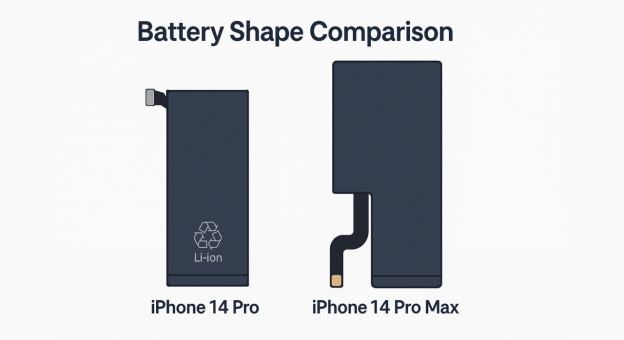
When selecting a replacement battery for the iPhone 14 Pro or 14 Pro Max, technicians should ensure the battery matches the device’s specifications. Differences in battery capacity, size, and connector design mean batteries are not interchangeable between the two models. Using an incompatible battery may lead to charging issues, overheating, or reduced battery life.
For reliable performance, repair shops should choose OEM-grade batteries that have passed capacity, cycle, and safety testing. High-quality batteries help maintain stable charging, reduce warranty claims, and support long-term customer satisfaction.
Common Repair Challenges and Precautions
In high-volume repair shops, battery adhesive is often the most time-consuming part of the repair process. Technicians frequently report that improper heat application can damage display cables or weaken water-resistant seals, increasing the risk of return repairs.
Step-by-Step iPhone 14 Pro Max Battery Replacement Process
Replacing the iPhone 14 Pro Max battery requires precision, the right tools, and strict safety precautions to avoid damaging the device. Technicians should follow each step carefully and maintain proper temperature control and ESD protection throughout the process.
Important Safety Warnings Before You Begin
- Always discharge the battery to below 25% to reduce the risk of fire, especially if the iPhone’s battery is swollen.
- Too much heat can damage seals, the display cable, or cause internal warping.
- Never pull or pry a swollen battery; use controlled heat and adhesive remover.
- Opening the iPhone may void the warranty; shops must inform users beforehand.
- Water resistance is not fully maintained once the screen adhesive is removed.
Step 1: Check Battery Health
Before starting the replacement, verify whether the battery capacity and battery health justify a new battery. Go to: Settings → Battery → Battery Health. If the maximum capacity is below 80%, it’s time for a battery replacement.

Step 2: Power Down & Remove Screws
Turn off the device, then remove the two bottom Pentalobe screws with the appropriate screwdriver. This is the first step in safely opening the phone without risking cable damage.

Step 3: Apply Controlled Heat to Loosen Adhesive
Use a separator machine, heat gun, or hair dryer to warm the screen edges. Ideal temperature: 80°C for an extended period of 1–2 minutes.
This softens the adhesive without overheating the screen or internal components. Attach a suction cup to the lower half of the display and gently lift to create a separation point.
Step 4: Open the Display Carefully
Insert an opening pick under the bezel, no deeper than 3 mm, to avoid cutting cables. Slide the pick along the edges to loosen the screen seals.

Prop the display against a stable stand without straining the display cable. Apply a protective sticker over the front camera to avoid dust or accidental scratches.
Step 5: Disconnect Display & Battery Cables
Remove the internal connector brackets using a precision screwdriver. Detach the following using a plastic spudger:
- Battery connector
- Display cable
- Sensor and antenna cables
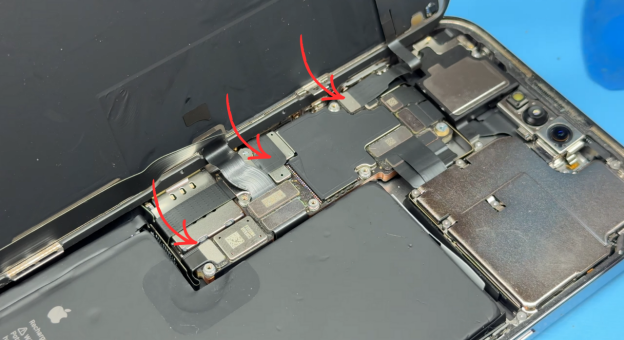
Caution: Only proceed once the battery is fully disconnected.
Step 6: Remove the Old Battery
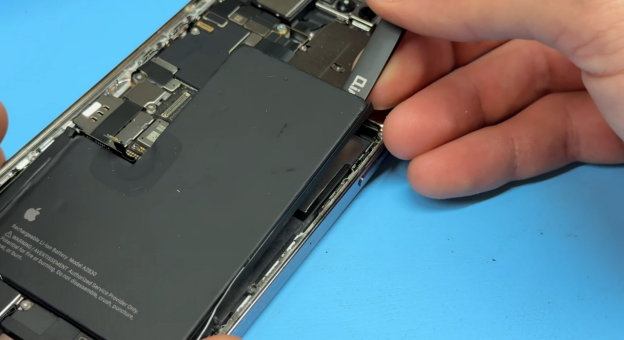
Apply a few drops of IPA or adhesive remover along the edges of the battery. Let it soak for several seconds, then gently lift the battery using a spudger.

Precaution: Do NOT bend or puncture the cell, as this increases the risk of thermal events.
Clean the battery compartment thoroughly to remove any remaining adhesive.
Step 7: Install the New Battery
Prepare the new battery by attaching adhesive strips (included in most replacement kits). Press the adhesive firmly with a roller, then fold the tabs correctly.

Place the battery into the housing, align the connector, plug it in briefly, then unplug again to reset connection memory. Re-press the battery into place using the roller for even contact.

Source: YouTube
Step 8: Reassemble the iPhone
Apply fresh screen adhesive to the frame. Reconnect the display, sensor, and battery cables in reverse order. Power on the iPhone and test:
- Display responsiveness and True Tone
- Face ID
- Wired and wireless charging
- Speaker and mic
- Battery detection & charging load
Step 9: Final Assembly & Testing
Reinstall the connector brackets and screws. Seal the iPhone display by aligning the edges and pressing firmly around the perimeter. Replace the bottom Pentalobe screws to complete the installation.
Common Mistakes During iPhone 14 Pro Max Battery Replacement
- Using excessive heat
Too much heat can damage the OLED display, Face ID components, or internal seals.
- Damaging the battery connector
Improper removal may lead to charging issues or motherboard damage.
- Skipping battery calibration
Failing to calibrate the new battery can result in inaccurate battery health readings.
- Using low-quality adhesive
Poor adhesive affects screen alignment and reduces water resistance.
Post-Replacement Best Practices & Notes
- After replacement, the device may lose its original water-resistance/IP sealing. Properly replacing adhesive reduces the risk but does not guarantee IP preservation.
- If the replacement battery is not “genuine Apple parts,” iOS may show a warning about “Battery Unable to verify this iPhone has a genuine Apple battery.” On newer iOS versions, compensate accordingly (or offer calibration support if OEM is high-quality).
- Always use ESD-safe tools and avoid metal contact with battery cells to prevent fire or thermal runaway.
iPhone 14 Pro Max Original vs OEM Battery — Which Is Better?

Choosing the right replacement battery is one of the most important decisions for any repair shop, especially when customers are worried about battery life, performance, and long-term device safety.
Original (Genuine Apple) Battery
A genuine Apple battery offers the highest level of safety, power efficiency, and long-term battery life. Because it’s manufactured to match the iPhone 14 Pro Max’s exact battery capacity and voltage, technicians get consistent performance and accurate battery health readings.
However, original units are often difficult to purchase, expensive, and may require Apple’s proprietary calibration tools during replacement. Many repair shops avoid them due to limited supply and higher cost.
Pros
- Best safety and thermal performance
- Accurate battery health reporting
- Strong longevity and stable charging behavior
Cons
- Hard to source from a reliable seller
- Higher price point
- Often requires Apple-specific tools and service procedures
High-Quality OEM Battery
A high-quality OEM replacement battery is a practical choice for repair shops and wholesalers. When sourced from a reliable manufacturer, it provides stable performance, consistent charging, and dependable cycle life at a lower cost than genuine Apple batteries.
To ensure quality and safety, choose OEM batteries that pass strict QC testing, including capacity, cycle, temperature, and IC protection tests. This helps reduce warranty claims and improves long-term customer satisfaction.
Pros
- More affordable for shops handling high repair volume
- Easy to source in bulk with a consistent supply
- Good performance when manufactured and tested properly
Cons
- Battery health values may be slightly inaccurate
- Risk of overheating or swelling if purchased from low-tier suppliers
Risks of Low-Quality Replacement Batteries
Low-quality batteries may cause overheating, inaccurate battery health readings, rapid capacity loss, unexpected shutdowns, or charging instability. For repair businesses, these issues often lead to warranty claims and repeat repairs.
Which Should Repair Shops Choose?
If your customers prioritize authenticity and are willing to pay a higher price, a genuine Apple replacement offers ideal long-term performance. But for most repair centers, especially those working with repeat customers or offering refurbished iPhone 14 Pro and Pro Max units, a high-quality OEM battery offers the best balance of value, reliability, and availability.
For B2B buyers, the key is to choose OEM batteries that are factory-tested, sealed correctly, and include over-current, thermal, and discharge protection. This reduces service risk, supports warranty coverage, and ensures the device performs normally after installation. These factors also determine the average cost of iPhone battery replacement.
Comparison Table: Original vs OEM Battery for iPhone 14 Pro Max
| Feature / Spec | Original (Genuine Apple Parts) | High-Quality OEM Battery |
| Battery Capacity | Matches exact Apple specs | Matches or slightly varies |
| Battery Health Accuracy | 100% accurate | May show slight variation |
| Performance & Longevity | Best in class | Good when properly manufactured |
| Heat & Overheating Control | Excellent thermal management | Depends on the quality level |
| Availability | Hard to source | Easy to purchase in bulk |
| Price / Repair Cost | High | More affordable |
| Tools Needed | May require Apple tools | Standard repair tools |
| Warranty Considerations | Better alignment with device warranty | Depends on supplier QC |
| Ideal For | Premium clients & authorized shops | Repair shops, wholesalers, refurbishers |
How Long Does an iPhone 14 Pro Max Battery Replacement Take?

For a trained technician, an iPhone 14 Pro Max battery replacement typically takes 20–30 minutes, depending on the tools used and how quickly the display, battery, and cable connections are handled.
Most of the time is spent reopening the device, managing the adhesive seals, and ensuring the replacement battery sits correctly without stressing the display cable or overheating the phone during installation.
During reassembly, avoid applying too much heat, double-check each connector, and ensure no components are attached in the reverse order.
Post-Replacement Testing Checklist
Before returning the phone to the user, run these quick tests:
- Confirm the new battery charges typically (wired + wireless).
- Check battery health loads correctly in Settings.
- Test the display touch response, True Tone, and Face ID after reconnecting the screen.
- Run a short performance test to ensure no unexpected shutdowns.
- Verify that the model boots without error messages related to the replacement.
Where to Buy High-Quality iPhone 14 Pro Max Batteries in Bulk?
Finding a reliable supplier for iPhone 14 Pro Max battery replacement parts is essential for repair shops, wholesale buyers, and electronics distributors who need consistent battery health, stable battery capacity, and dependable shipping.
With rising customer demand and increasing repair volume, choosing a trusted replacement battery partner directly impacts your shop’s performance, warranty risk, and long-term value.
Below are the key reasons technicians and B2B buyers consistently choose SQLCD (Super Quest) as their preferred supplier for iPhone 14 Pro and 14 Pro Max batteries.
Why Repair Shops Choose SQLCD?
- OEM-grade cells
- Strict QC testing
- Stable inventory
- Global shipping
- Technical support
Frequently Asked Questions
Is it worth replacing an iPhone 14 Pro Max battery?
Yes. Replacing the battery restores battery life, improves performance, and extends the device’s lifespan at a much lower cost than upgrading to a new phone.
Does an OEM battery affect performance?
A high-quality OEM iPhone battery performs normally as long as it’s properly tested for capacity, cycle count, and IC stability. Low-tier parts may cause overheating or shorter battery life.
How long does an iPhone 14 Pro Max battery replacement take?
Professional technicians typically complete the repair in 20–30 minutes, while additional testing may extend the process slightly.
Can a bad battery damage the motherboard?
Yes. Poorly manufactured batteries or units with unstable ICs can cause voltage spikes, risking motherboard damage or charging failures. Always purchase from a verified seller.
How to verify battery authenticity?
Check battery capacity, label quality, connector design, and IC readings. Reliable suppliers provide test reports, cycle data, and feedback from repair shops to confirm consistency.
Does replacing an iPhone battery erase data?
No. Battery replacement does not affect stored photos, apps, or personal data when performed correctly.
Can I use my iPhone immediately after battery replacement?
Yes. However, allowing the battery to complete one full charge cycle helps improve calibration accuracy.
Conclusion
An iPhone 14 Pro Max battery replacement is one of the most cost-effective ways to restore battery life, improve performance, and extend device longevity.
Whether you choose a genuine Apple battery or a high-quality OEM alternative, using reliable components and following proper installation procedures is essential for long-term reliability.
For repair shops and distributors, sourcing tested OEM-grade batteries helps reduce warranty claims, improve customer satisfaction, and maximize repair profitability.